Description
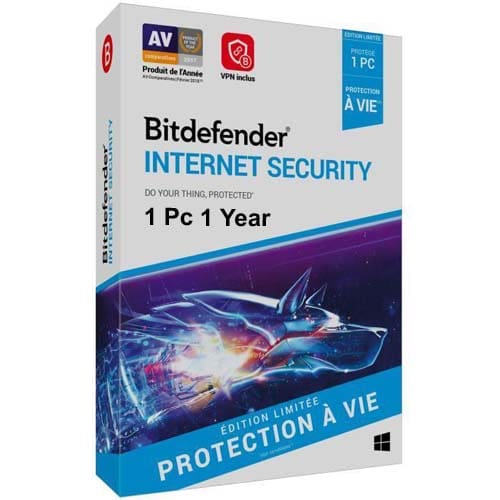
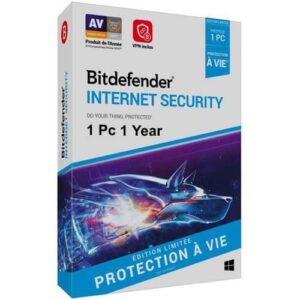
Bitdefender Internet Security 1 PC 1 Year – Ultimate Protection for Your Windows PC
Bitdefender Internet Security 1 PC 1 Year provides unmatched protection against online threats while ensuring that your system performance remains fast and smooth. With advanced features like Ransomware Protection, Firewall, and Anti-Phishing, you can protect your data, privacy, and online transactions without slowing down your device. Bitdefender’s Autopilot mode allows the software to make optimal security decisions on your behalf, giving you the ultimate peace of mind.
Key Features of Bitdefender Internet Security 1 PC 1 Year:
1. Zero Performance Impact with Bitdefender Photon
Bitdefender’s Photon Adaptive Technology customizes the way the software interacts with your system based on usage patterns. This ensures that you get top-level protection without any noticeable impact on performance.
2. Antivirus & Anti-Malware Protection
Bitdefender effectively prevents, detects, and removes all types of malware, including viruses, worms, Trojans, ransomware, rootkits, keyloggers, and backdoors.
3. Ransomware Protection
Bitdefender’s Ransomware Protection ensures your critical files and system areas remain secure, preventing ransomware attacks from damaging your data.
4. Active Threat Control
Using advanced heuristic methods, Active Threat Control helps detect and block new and unknown threats in real-time, even before they are officially identified.
5. Vulnerability Scanner
The Vulnerability Scanner identifies and addresses security flaws in your operating system and applications, ensuring that your software is up to date and functioning properly.
6. Remote Management
With a Bitdefender Central Account, you can manage and control your security settings and even take remote actions on your Bitdefender software, regardless of where you are.
7. Secure Browsing
Bitdefender ensures a safe browsing experience, warning you about malicious websites, potential phishing threats, and online fraud.
8. File Shredder
When you need to permanently delete sensitive files, the Bitdefender File Shredder makes sure that the data is physically removed from your hard disk and cannot be recovered.
9. Battery Mode (For Laptops & Tablets)
Optimized for mobile users, Battery Mode minimizes the software’s impact on your system’s power consumption, postponing updates and scans to help save battery life.
10. Anti-Fraud & Anti-Phishing
Protect yourself from fraudulent websites and phishing attacks with Anti-Fraud and Anti-Phishing features that block malicious links and websites designed to steal your sensitive information.
11. Rescue Mode
In case of a system compromise, Rescue Mode allows you to scan and disinfect your entire hard drive outside of your operating system, ensuring a clean and secure reboot.
12. USB Immunizer
Bitdefender’s USB Immunizer prevents malware from automatically executing when you insert a USB drive, protecting your device from potential infections.
13. Password Manager
Keep your passwords, credit card details, and other sensitive information securely stored in a Password Manager, making sure they remain protected from hackers.
14. Weekly Security Report
Every week, Bitdefender sends you a Security Report, detailing the malware blocked, infections removed, and any other relevant security activity on your system.
15. Social Network Protection
Bitdefender helps protect your social media accounts by blocking malicious links and threats received through Facebook, Twitter, Pinterest, or any other social network.
16. Bitdefender Autopilot
Autopilot makes security decisions for you, optimizing settings and applying the best protective measures to ensure you’re always safe without needing to worry about manual adjustments.
17. Hotspot Protection
Whenever you connect to an unsecured network, Hotspot Protection encrypts your internet traffic to keep your data safe from hackers and other cyber threats.
18. Safe Pay (Fast & Secure Payments)
When conducting online transactions, Safe Pay ensures your financial information is protected by using a secure, isolated browser to safeguard your credit card details and banking credentials.
19. Firewall Protection
Bitdefender’s powerful Firewall filters all inbound and outbound traffic to ensure that unauthorized connections are blocked, giving you an extra layer of security while you are online.
20. Anti-Spam
Bitdefender’s Anti-Spam feature filters out unwanted and malicious emails, ensuring your inbox stays free of spam, phishing attempts, and other email threats.
21. Parental Control
Manage your children’s online activities by controlling access to websites and apps with Parental Control. You can set restrictions based on categories or block specific URLs.
System Requirements:
- Operating Systems: Windows 10, 8.1, 8, 7, XP (Service Pack 2 or later), Windows 2000 (Service Pack 4)
- Processor: 1 GHz or faster
- RAM: 1 GB for 32-bit systems, 2 GB for 64-bit systems
- Hard Disk Space: 1.1 GB
- Internet: Internet Explorer 6 or later, and an internet connection for updates
How to Install Bitdefender Internet Security 1 PC 1 Year:
- Download the installer from the official Bitdefender Internet Security Download Page.
- Run the setup by double-clicking the downloaded file.
- Click Install and follow the on-screen instructions to complete the installation.
- Once installed, click Start Using Bitdefender Internet Security.
- Sign up for a Bitdefender account and enter the activation code (product key) you received from https://antiviruskey.in.
- After entering the code, click Continue, then Finish to activate your Bitdefender Internet Security.
Why Buy From Antiviruskey.in?
At Antiviruskey.in, we are committed to delivering the best antivirus products with excellent customer service. When you purchase Bitdefender Internet Security from our website, you get:
- Instant Product Key Delivery: Receive your activation key in just seconds after purchase.
- Affordable Prices: Get Bitdefender at a lower cost compared to other retailers.
- Expert Support: Our team is always available to assist with any issues and ensure you have a seamless experience.
- Genuine Product Keys: We only provide authentic, official product keys.
Buy Bitdefender Internet Security 1 PC 1 Year Today!
Ensure the security of your PC and data by purchasing Bitdefender Internet Security from Antiviruskey.in. With instant activation, competitive prices, and excellent customer support, you can stay protected with peace of mind.
Thank you for choosing Antiviruskey.in – Your trusted source for online security.

 Quick Heal
 Net Protector
 Kaspersky
 K7
K7 Bitdefender
 ESET NOD32
 McAfee
 Mobile Antivirus
















Reviews
There are no reviews yet.